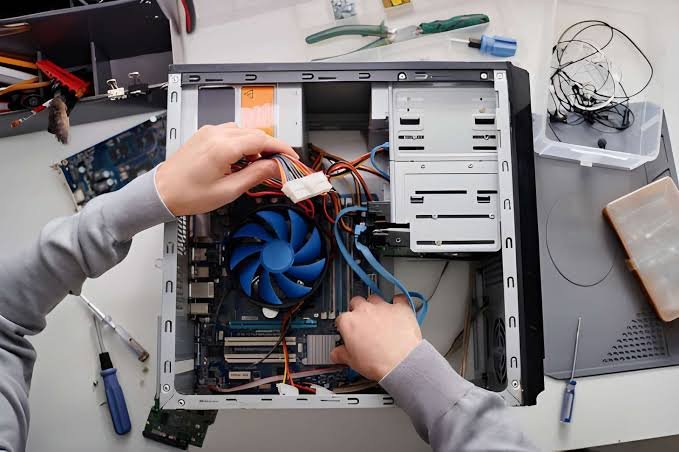
When a computer stops working, a printer refuses to connect, or your home Wi-Fi becomes unreliable, getting technical help should not create another problem. On-site computer repair in Edmonton offers a practical alternative to transporting equipment to a repair shop: a technician visits your home or workplace to investigate the issue and provide assistance where the technology is actually used.
Tech!Espresso provides on-site computer and technical support for residential and business customers in Edmonton, covering PC and Mac troubleshooting, printer problems, network issues, and smart-home technology. Same-day appointments may be available depending on technician scheduling and the nature of the problem. Its Fixed-or-Free policy is another point customers can ask about when arranging a service visit.
Understanding what an on-site technician can help with, how the process works, and what information to prepare can make your repair appointment more productive.
What Is On-Site Computer Repair?
On-site computer repair is a technical support service where a technician travels to a customer’s home or business instead of requiring the customer to bring the equipment to a repair location.
This approach is particularly useful when the problem involves more than one device or depends on the surrounding setup. For example, a computer might work correctly on its own but fail to connect to a wireless printer, shared office network, or smart-home device.
A technician can examine the equipment in its normal environment, check relevant connections, investigate configuration problems, and explain possible solutions.
For Edmonton residents and businesses, on-site support can help address problems involving:
- Desktop computers and laptops.
- Windows PCs and Apple Mac computers.
- Printers and scanners.
- Wi-Fi routers and home networks.
- Office network connections.
- Smart-home devices and connected equipment.
- Software installation and configuration.
The exact repair that can be completed during a visit depends on the fault, equipment model, required parts, and available diagnostic options.
Why Choose On-Site Computer Repair in Edmonton?
Taking a computer to a repair shop is not always convenient. Desktop computers can be difficult to transport, office equipment may be connected to several devices, and network problems can be difficult to reproduce outside the original environment.
An on-site appointment addresses some of these practical limitations.
1. Get Help Without Transporting Your Computer
A desktop computer, monitor, printer, and collection of cables can be awkward to move. Even a laptop can be inconvenient to transport when it is part of a home-office setup.
With an on-site service, the technician comes to the agreed location. You can explain the problem using the equipment and connections involved rather than trying to describe everything after disconnecting it.
2. Troubleshoot Problems in Their Actual Environment
Some technical issues are caused by the relationship between devices rather than a single faulty component.
Consider a printer that works through a USB connection but cannot communicate over Wi-Fi. The problem might involve the wireless network, printer configuration, computer settings, or router.
Examining the setup where the problem occurs can help identify the relevant cause.
3. Support Home and Business Technology
Residential customers may need help with a slow laptop, unreliable internet connection, printer setup, or smart-home equipment.
Businesses may need assistance with workstation problems, office computers, printers, shared networks, or other technology interruptions.
On-site technical support can be useful in both environments because the technician can assess the equipment and connections at the location where they are used.
4. Ask About Same-Day Appointment Availability
A computer problem can interrupt work, communication, studying, or everyday activities. Same-day service may therefore be valuable when an issue needs attention quickly.
Tech!Espresso offers same-day residential and business visits subject to availability. Customers should confirm appointment times when booking rather than assuming that every repair can be completed on the same day.
What Computer and Technology Problems Can a Technician Help With?
The right repair approach depends on the device and symptoms. Here are several common categories of on-site technical support.
PC and Laptop Repair
Windows computers can develop hardware, software, performance, and connectivity problems.
Common symptoms include:
- A computer that runs unusually slowly.
- Windows startup or update problems.
- Unexpected shutdowns or freezing.
- Software installation errors.
- Virus or malware concerns.
- Hardware or peripheral connection problems.
- Difficulty connecting to the internet.
A technician can investigate the reported symptoms, perform appropriate diagnostics, and explain the available repair options.
For example, a slow computer might need software troubleshooting, additional memory, storage attention, or a review of unnecessary background applications. It is important to identify the actual cause before recommending a replacement or upgrade.
Mac and MacBook Support
Apple computers can also experience performance, software, hardware, and connectivity problems.
Common Mac support requests include:
- macOS configuration and troubleshooting.
- MacBook performance issues.
- Problems with external displays.
- Printer connectivity.
- Software installation and compatibility.
- Wi-Fi and network connection problems.
- Data backup and transfer assistance.
Not every Mac problem requires hardware replacement. Sometimes the issue involves settings, software conflicts, storage limitations, or connected equipment.
The Mac model and macOS version are useful details to provide when requesting assistance.
Printer Repair and Setup
A printer that stops working can interrupt home administration and business operations.
Common printer problems include:
- The computer cannot detect the printer.
- Wireless printing suddenly stops.
- Print jobs remain stuck in the queue.
- Printer drivers are missing or outdated.
- Multiple devices cannot access a shared printer.
- The printer repeatedly disconnects from Wi-Fi.
Printer troubleshooting may involve checking the physical connection, wireless network, device settings, software drivers, and print queue.
Before booking, provide the printer’s make and model and explain whether it connects through USB, Wi-Fi, or an office network.
Wi-Fi and Network Troubleshooting
A slow or unreliable internet connection does not always mean the internet provider is responsible.
The problem might involve the router, wireless signal, device configuration, network congestion, or a connection between the computer and the network.
Technical support can help investigate issues such as:
- Devices repeatedly disconnecting from Wi-Fi.
- Weak wireless coverage in certain rooms.
- Computers failing to connect to the router.
- Network printers becoming unavailable.
- Office devices having trouble communicating.
- Router configuration and connectivity problems.
An on-site assessment can be particularly useful because the technician can examine the network equipment and affected devices in their normal locations.
Smart-Home Technology Support
Connected home devices depend on reliable internet access, compatible applications, wireless settings, and correct device configuration.
When something stops responding, identifying the cause can require checking several connected components.
Depending on the device and issue, smart-home troubleshooting may involve:
- Smart-home device connectivity.
- Wireless network configuration.
- Smart TV and connected-device setup.
- Device pairing and application settings.
- Communication problems between compatible devices.
Customers should provide the device brand and model before the appointment so the technician can better understand the problem.
On-Site Computer Repair for Edmonton Homes and Businesses
Residential and business customers often have different technical requirements.
Residential Computer Repair
Home users may rely on a single laptop for work, several devices for family use, and a shared wireless network for entertainment and communication.
A problem with one component can affect the entire setup.
For example, a wireless printer may stop working after a router replacement. A laptop may connect to the internet while another computer cannot. A smart TV may lose its connection even though other devices work normally.
Having the equipment examined at home can help reveal whether the problem is isolated to one device or connected to the wider network.
Business Computer and IT Support
Businesses depend on computers, printers, networks, and connected equipment to keep daily operations moving.
Technical interruptions can affect employees, customer communication, document processing, and access to important files.
On-site business support can help investigate issues involving:
- Office PCs and laptops.
- Business printers and scanners.
- Workstation connectivity.
- Shared network resources.
- Software configuration.
- Office Wi-Fi and router problems.
When requesting service, businesses should identify the number of affected devices, the symptoms, and whether the problem is preventing employees from completing essential tasks.
This information can help the service provider understand the situation before scheduling a visit.
How to Prepare for an On-Site Computer Repair Appointment
A little preparation can make technical troubleshooting easier.
Before the technician arrives, consider these steps:
1. Write down the symptoms. Explain what happens, when the problem started, and whether it occurs every time or only occasionally.
2. Identify the affected equipment. Record the computer, printer, router, or smart-home device brand and model.
3. Keep relevant accessories available. Power adapters, cables, external drives, and other related equipment may be necessary for testing.
4. Make a backup where possible. If the computer still works, back up important documents and personal files before repair work begins.
5. Make sure you can access the equipment. For business appointments, arrange access to the affected workstation, printer, network equipment, or relevant work area.
6. Prepare account access safely. You may need to enter your own passwords or approve device access. Avoid sending passwords through unsecured messages.
7. Explain what you have already tried. Mention any troubleshooting steps, recent updates, new installations, or hardware changes.
These details can help reduce unnecessary investigation and make the appointment more focused.
What Is the Tech!Espresso Fixed-or-Free Policy?
The Fixed-or-Free policy is an important part of Tech!Espresso’s service positioning.
In simple terms, the policy is intended to provide reassurance when a reported repair cannot be completed successfully. However, customers should confirm the exact terms before authorizing work.
Ask about:
- Which repairs and devices qualify.
- Whether diagnostic or travel charges are covered.
- Whether replacement parts are included.
- What happens when a problem cannot be resolved.
- Any exclusions or special conditions.
- Whether the policy applies differently to residential and business appointments.
Understanding these details before the visit helps establish clear expectations and avoids misunderstandings.
The policy should be considered alongside the actual repair assessment, not as a guarantee that every technical issue can always be resolved.
How to Arrange On-Site Computer Repair in Edmonton
If your PC, Mac, printer, network, or smart-home equipment is not working properly, start by describing the problem and identifying the affected device.
You can then ask about the appropriate service, appointment availability, estimated costs, and any preparation required.
For service information and booking options, visit Tech!Espresso’s on-site computer repair service in Edmonton.
When contacting the company, include:
- Your general Edmonton service location.
- Whether the appointment is residential or business-related.
- The device type and model.
- A short description of the problem.
- Any error messages displayed.
- Your preferred appointment time.
Providing accurate information makes it easier to understand the service request and determine the next steps.
Frequently Asked Questions
What is on-site computer repair in Edmonton?
On-site computer repair is a service in which a technician visits a customer’s home or business to troubleshoot and repair computer-related problems. It can cover PCs, Macs, printers, network connections, and supported smart-home equipment.
Can a computer technician come to my home in Edmonton?
Yes. Tech!Espresso provides on-site residential technical support in Edmonton. Customers can ask about available appointments and whether their specific repair requirement can be handled at home.
Does Tech!Espresso offer business computer repair?
Tech!Espresso provides on-site technical support for business customers as well as residential customers. Businesses can ask about assistance with computers, printers, networks, and other supported technology.
Can an on-site technician fix both PC and Mac problems?
PC and Mac troubleshooting can involve software, hardware, performance, configuration, and connectivity issues. The specific repair options depend on the device model, fault, and availability of required components.
Can a technician troubleshoot a printer that will not connect to Wi-Fi?
Yes. Wireless printer problems can involve the printer, router, computer settings, drivers, or network configuration. An on-site technician can examine the relevant connections and troubleshoot the setup.
Does Tech!Espresso provide same-day computer repair in Edmonton?
Same-day appointments may be available depending on scheduling, technician availability, and the type of problem. Contact the company to confirm current appointment options.
What does Fixed-or-Free mean?
Fixed-or-Free is Tech!Espresso’s repair policy, intended to provide reassurance if a covered repair cannot be completed. Customers should review the current policy and confirm eligibility, exclusions, and applicable charges before proceeding.
Should I back up my computer before a repair visit?
Yes, if the computer is operational, backing up important files is a sensible precaution. Although many troubleshooting tasks do not require data removal, some repairs or software procedures may involve risks to stored information.
Is on-site computer repair better than taking a computer to a shop?
It depends on the problem. On-site support is especially useful when equipment is difficult to transport or when the issue involves a home or office network, printer, router, or connected devices. Some repairs may still require specialized workshop equipment or parts.
Get Help With Your Computer and Connected Devices in Edmonton
Computer problems do not always stay limited to one device. A printer connection issue may involve the wireless network, a slow laptop may have a software or hardware cause, and a smart-home problem may depend on router configuration.
On-site computer repair offers a practical way to investigate these issues where the equipment is used.
For residential and business customers in Edmonton, Tech!Espresso provides a route to on-site assistance with PC and Mac computers, printers, networks, and smart-home technology. Check appointment availability, explain your technical issue, and ask about the Fixed-or-Free policy before arranging your service.
Generate Stylish Name Fonts for free.